

What players say
Picture Palette Play succeeds by keeping things simple. The tap-to-fill coloring is responsive, and the sticker placement encourages thoughtful composition. The freehand drawing mode is a nice bonus for children who want to create original art. Parents will appreciate the absence of ads and the straightforward save function. While the doll-themed page selection is limited, the quality of the line art is charming. This is a solid choice for quiet, screen-based creative time.
About this game
Getting Started with Your Palette
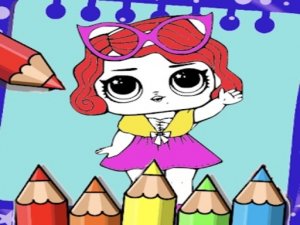
Upon opening the application, players see a gallery of doll-themed line drawings. Each image offers large, clearly defined spaces that are easy to tap or click. A color bar at the bottom of the screen presents a broad spectrum of shades, from soft pastels to bright primaries. Tapping a color then tapping a section of the picture fills that area instantly. This straightforward interaction lets even very young users begin creating without needing to read instructions.
Adding Personal Touches
Beyond basic coloring, the tool includes a sticker collection. Small decorative elements such as stars, flowers, and bows can be placed anywhere on the canvas. This feature encourages children to think about composition and balance as they decide where each sticker fits best. The stickers are non-animated and remain static once placed, keeping the interface calm and focused on the creative process.
Freehand Drawing Mode
For those who want to move beyond pre-made outlines, a blank canvas mode is available. Here, young artists can draw original shapes, patterns, and scenes using the same color palette. The drawing tool supports variable line thickness, allowing for both broad strokes and fine details. This mode is particularly useful for practicing hand-eye coordination and exploring cause-and-effect relationships between touch input and visual output.
Saving and Sharing Artwork
Once a piece is complete, the application provides a simple save function. The artwork is stored as a standard image file on the device, which can then be printed, emailed, or posted to social media with parental supervision. This feature gives children a sense of accomplishment and allows parents to celebrate their child's progress over time. No personal data is collected during the save process, ensuring privacy remains protected.
Designed for Independent Play
The entire interface uses large buttons, clear icons, and minimal text. Menus are straightforward, with no complex navigation paths. This design choice means that children can explore the activity without constant adult assistance. The absence of timers, scores, or competitive elements keeps the experience low-pressure and purely recreational. Parents can feel confident leaving their child to play in this self-contained digital environment.


Player comments
Sign in to comment
You must be logged in before posting a review or rating.
No account? Create one
No comments yet. Be the first to comment!